

 inside Vali
Vali finds you new clients and suppliers
The first South African-built ERP that does. Open any product to see the businesses most likely to need it, and ask other suppliers for a better price, all from your own email.
Both directions, from one product
Who buys what you sell, and who sells what you buy
Every product in Vali has two new places to look, both filled from SupplyLoop, a directory of thousands of South African businesses built from their own websites.
Find new customers
The Who buys this tab lists businesses that asked for it on SupplyLoop, and businesses likely to need it, with the reason.
See how Products you buyFind better suppliers
Under Suppliers, see other South African businesses that sell it, ask up to five for a price, and compare the quotes side by side.
See howNew customers
Who buys this
Asked for it
Businesses that put your product on their SupplyLoop "We buy" list and chose to be seen by suppliers.
Likely buyers
Businesses most likely to need it, worked out from what they sell, with the reason shown.
Already yours
Existing customers and leads are marked, so you see at a glance who you already know.
Businesses that most likely need your product, worked out from what they sell, each with the reason and where they are. Add one as a lead, or introduce yourself.
One short email from your own email account, saying what you sell, with your phone number, your website and a line of your own. Their reply comes back to your own inbox.

Introductions, done properly
A handshake, not a mailing list
- One introduction per business, ever. Vali never sends a follow-up.
- It goes from your own email account, in your company’s name, and the reply comes back to you.
- Vali never emails anyone in your contacts who asked not to be.
- Add as lead puts the business in your Vali CRM with SupplyLoop as the lead source.
Better suppliers
Three prices on your desk, without three phone calls
Under a product’s suppliers, Vali lists other South African businesses that sell it. Tick up to five and press Ask for quotes. Each one gets an email from your own account with a link to send their price.
- 1Find suppliers
- 2Ask for quotes
- 3They reply on a short form
- 4Compare, cheapest marked
- 5Make purchase order
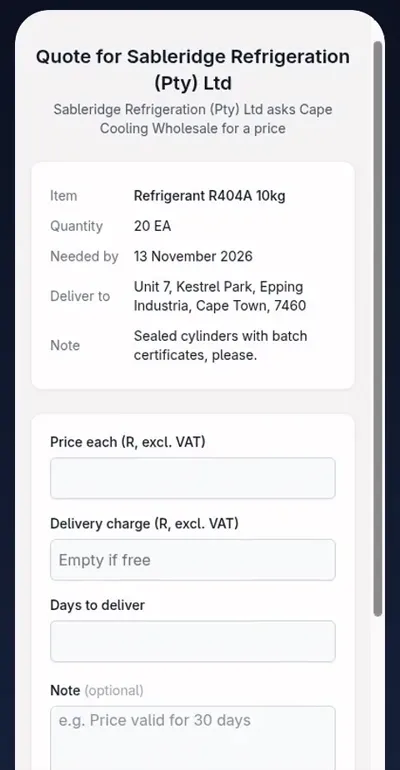
No login for the supplier
The supplier opens the link on their phone, types a price, the delivery charge and the days to deliver, and can attach their own quote. A price given over the phone can be typed in by your buyer.
Vali works out each total with delivery and marks the cheapest. Make purchase order fills in the supplier, their price and the delivery date.

Where the businesses come from
SupplyLoop: South African businesses, found on their own websites
SupplyLoop is a free directory of South African businesses, built by Teacup Technology, the company behind Vali. It reads each business’s own public website to learn what they sell and where they deliver, so a search finds local businesses instead of overseas websites and paid adverts.
Vali is plugged straight into it, so inside Vali you never leave the product screen.
Visit supplyloop.co.za
Your company stays in control
You switch it on, and your data stays yours
Off until you switch it on
An administrator turns SupplyLoop on under Company Settings, Inventory, and can switch it off there at any time.
Your data stays in Vali
Vali sends SupplyLoop only the product name or the words you search for. Never your customers, prices, stock, invoices or staff.
Replies stay with you
Quote requests and introductions go from your own email account, and every reply and quote is kept in your Vali company.
Common questions
What is SupplyLoop?
A free directory of South African suppliers, built by Teacup Technology, the company behind Vali. It reads each business's own public website to learn what they sell and where they deliver. Have a look at supplyloop.co.za.
How does Vali know which businesses are likely to need my product?
SupplyLoop compares your product with what each business sells. A liquor store sells chilled drinks, so it is likely to need display fridges. Each business shows the reason, marked Likely or Maybe, and businesses that asked for your product on SupplyLoop are listed separately.
Will Vali send emails without me knowing?
No. Nothing is sent until you press Introduce us or Ask for quotes. Both go from your own email account in your company's name, and you can add a line of your own first.
How many introductions can I send?
One per business, ever, with no follow-up, and up to 20 a day. Anyone in your contacts who asked not to be emailed never gets one.
Do suppliers need a login to send a quote?
No. They open the link in the email on any phone or computer, type their price, delivery charge and days to deliver, and can attach their own quote. Prices given by phone can be typed in by your buyer.
What does Vali send to SupplyLoop?
Only the words you search for, usually a product name. Your customers, prices, stock, invoices and staff stay in Vali. See the privacy policy.
How do I switch it on?
An administrator turns SupplyLoop on under Company Settings, Inventory, and can switch it off there at any time.

See who buys what you sell
Book a guided demo on a video call and we’ll open one of your own products and show you which businesses are likely to need it, and who else sells what you buy.